If educational leadership has taught me anything, it’s that the ‘next big thing’ usually arrives with a lot of noise and very few instructions. Lately, that noise has been all about Artificial Intelligence, and for many of us, it feels like trying to learn a new language while the rest of the world is already shouting in it. I recently spent some time with Bex Rose—who is essentially the AI whisperer for schools—to figure out how we move past the ‘wait-and-see’ phase and actually get out on the dance floor with these tools.
Manual vs. Automatic: Why Prompting is Your New Essential Skill
Bex used a brilliant analogy: Manual vs. Automatic AI.
- Manual AI is all about the art of the prompt. It’s like learning to drive a stick shift—you have to understand the mechanics of how the tool thinks to get it moving.
- Automatic AI is where the heavy lifting is done for you through built-in tools. Think Google Classroom’s new features or Canva’s Magic Studio.
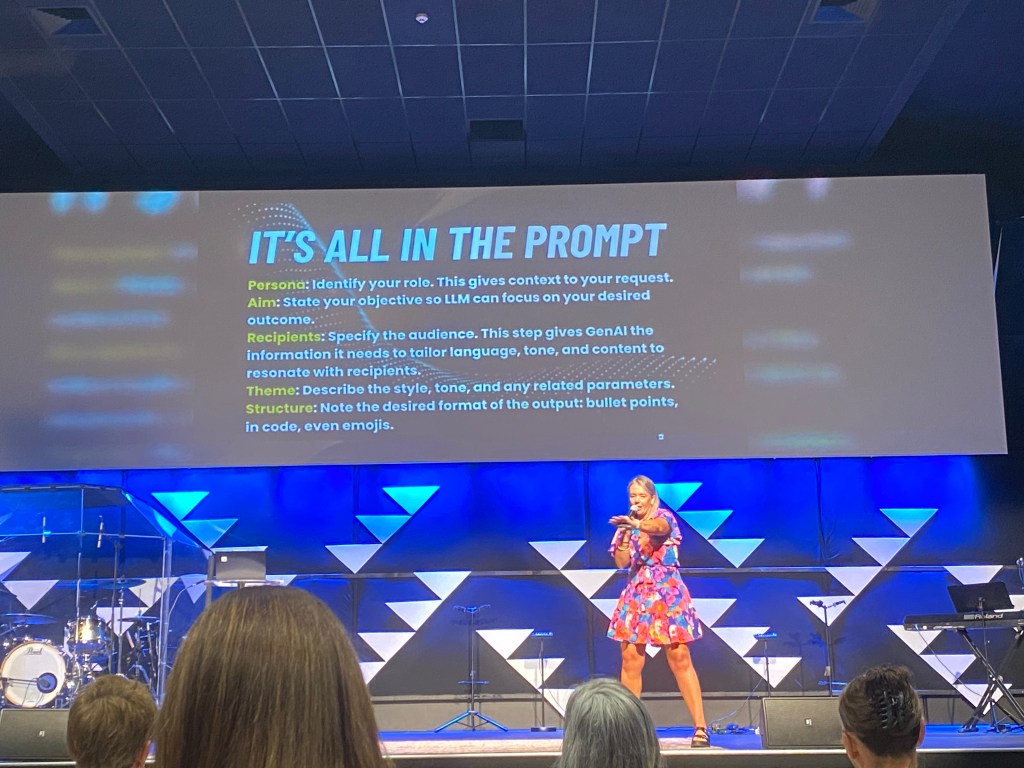
We spent a good chunk of time mastering the PARTS model for prompting:
- Persona (Who should the AI be? A 30-year veteran chef? A primary principal?)
- Aim (What exactly do you want it to do?)
- Recipient (Who is reading the output?)
- Theme/Tone (Polite? Empathetic? Engaging?)
- Structure (A table? A bulleted list? A report?)
Key takeaway for leaders: If we teach today’s students as we taught yesterday, we rob them of tomorrow. We need to be the ones on the dance floor first, showing them how to use these tools ethically and effectively.
The “Pantry” Dilemma: Keeping Your Data Safe
One of the most important discussions centered on where you put your data. Bex broke it down into three “pantries”:
- The Community Pantry (Free AI): Like a roadside stall, anything you put in, anyone can take out. Never put student names or sensitive reports here.
- The Staffroom Pantry (Enterprise Accounts): This is your school-logged Gemini account. It has an “electric fence” around it, meaning your data stays within your school’s domain. This is your safe zone for general admin.
- Your Own Pantry (NotebookLM & Gems): This is your personal, highly secure vault where you control exactly what information the AI sees.
Deep Dive: NotebookLM – The Educational Leader’s Swiss Army Knife
If I had to pick one “game-changer” from the day, it was NotebookLM. Imagine a personal AI assistant that only knows what you’ve taught it.
Here is how we as leaders can actually use it:
- Strategic Planning Support: Upload your current data, annual plans, and community feedback. Ask it to synthesize goals or identify gaps.
- Policy Audits: Upload a new policy and have it act as a board member, highlighting unintended consequences or areas for staff professional development.
- Board Report Summaries: Dump your raw data and have it draft clear, concise summaries for your next meeting.
- The Podcast Feature: This is actual witchcraft. It can take your uploaded documents and create a realistic, two-person podcast discussing the key concepts. Great for consuming long Ministry documents on your commute.
Why it’s better: It eliminates “hallucinations” (where the AI just makes stuff up) because it is anchored strictly to the sources you provide.
Where to From Here?
The Ministry might not be at the party yet with clear guidelines, but that doesn’t mean we can’t start building our own.
- Start Small: Don’t mandate a massive rollout. Let teachers play and “fail spectacularly” in a safe environment.
- Create Guardrails: Schools need a clear AI policy, plus specific guidelines for both teachers and students.
- Focus on Literacy: Move from just giving permission to building true AI literacy.
As Bex reminded us, AI isn’t necessarily taking jobs, but it is becoming a crucial part of the job description. It’s time we get comfortable on the dance floor.
 shem banbury
Leave a comment